Docs / Guides
How Handy Addons loads only what a page uses, and how to switch off the widgets you don't need at all.
Guide · 2 min read
Each widget has its own small stylesheet and, if it needs one, its own script. They load only on pages where the widget is used. A page with a counter loads the counter’s files, and nothing for the other widgets.
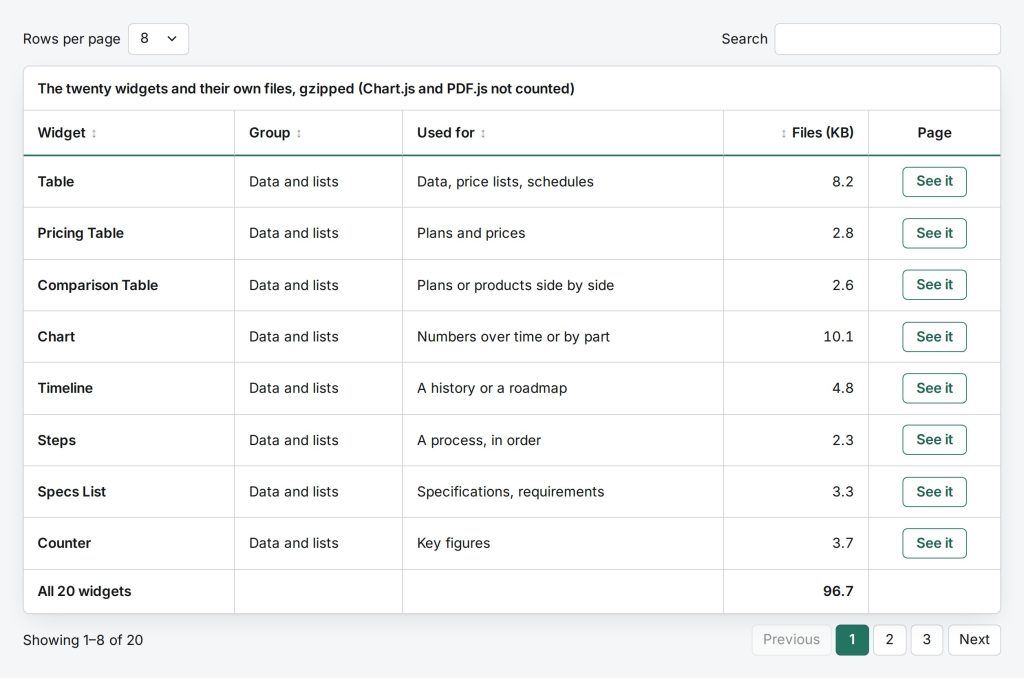
Most widgets’ own files are a few kilobytes, gzipped. The Table page lists every widget’s size, measured from the plugin itself.
No front-end script needs jQuery. Our widgets load no icon font of their own. The two larger libraries, Chart.js and PDF.js, load only with a chart or a PDF viewer, and only when it comes near the screen.
In your dashboard, open the Handy Addons menu. Every widget is listed by group, with a short description and a switch. Search for one by name, or switch many at once. A widget you switch off leaves Elementor’s panel and loads no code at all.
Before switching one off, make sure no page still uses it: a switched-off widget no longer shows where it was placed.
The widgets were tried with popular caching and speed plugins, including ones that delay or combine scripts, and with Elementor’s own performance options.
Data tables edited like a spreadsheet: import, sorting, search, pagination and responsive layouts.
Bar, line, area, pie, doughnut and radar charts from data you type, paste or import, with an accessible data table.
A number that counts up when it comes into view, with an icon and a title, and the right number for everyone who can't watch it count.
Install Handy Addons from WordPress.org, open a page in Elementor, and find them in the Handy Addons group of the panel.
May we count visits with Google Analytics, to learn which pages help? It sets cookies, so it runs only if you agree. Privacy policy